
Word Inventory
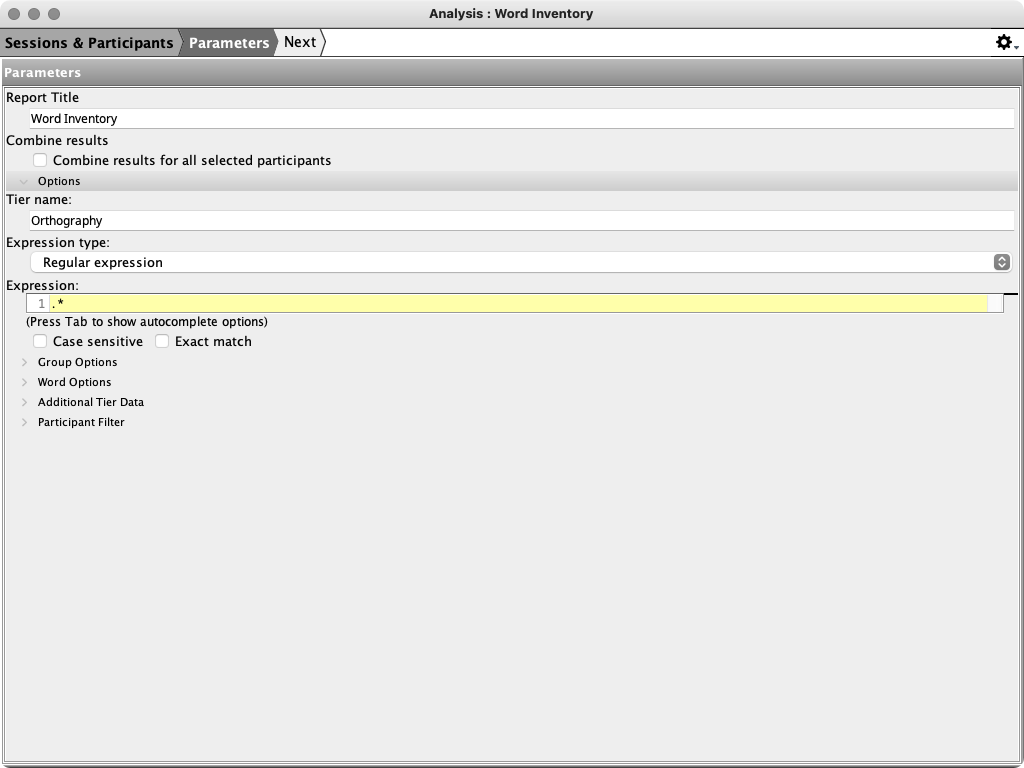
The Word Inventory analysis finds words on a selected tier and reports their type and token counts. By default, it returns every word on the Orthography tier.
Use this analysis to compare vocabulary size and word frequency across participants and sessions. You can also add word-aligned tiers, such as IPA Target or IPA Actual, to the inventory.
Before you begin
Assign a speaker to each record so that its results are included in the appropriate participant inventory. Check the word boundaries on the tier you want to search. If you add aligned words from other tiers, check the cross-tier word alignment as well.
The default search tier is Orthography, but any tier that can be searched by word may be selected.
Parameters
The analysis opens at the Parameters step. Its principal controls are:
| Parameter | Default | Effect |
|---|---|---|
| Report Title | Word Inventory | Sets the title of the generated report. |
| Combine results for all selected participants | Off | Combines the selected participants into one inventory instead of producing a separate summary and aggregate table for each participant. |
| Tier name | Orthography | Selects the tier from which the inventory words are returned. |
| Expression type and Expression | Regular expression .+ |
Matches the complete non-empty word supplied to the search. Change the expression to inventory only words that match a pattern. |
| Search by | Word | Applies the expression independently to each selected word rather than to the entire tier value. |
| Search by word | On | Enables word selection, word-pattern, aligned-word, and aligned word-data controls. |
| Aligned Word Filter | IPA Target, IPA Actual; no expression | Optionally restricts returned words by their aligned IPA word. The tier selection alone does not add those tiers to the inventory. |
| Add aligned words | None | Adds the selected word-aligned tier values as inventory data. Each added tier also receives its own type, token, and ratio columns in the Summary. |
The remaining expandable controls are the standard tier, word, additional-tier-data, and participant filters. See Common Query Parameters.
How words are counted
Each returned word contributes one token to its source tier. A type is a unique word
form in that tier, and the type-token ratio is the number of types divided by the
number of tokens. For example, six types among eight tokens produce a ratio of
0.75.
The Summary calculates unique forms without regard to letter case or diacritics. Forms that differ only in case or diacritics therefore count as one summary type. Token totals are unchanged.
The Aggregate table preserves case-sensitive inventory forms. Its rows can therefore distinguish forms that the Summary combines when calculating its type count. If aligned word tiers are added, the aggregate inventory includes those aligned values beside the primary-tier word.
Report output
The report begins with Readme and Parameters, followed by these sections:
| Section or table | Contents |
|---|---|
| Summary | One table per participant and one row per session. Each row lists the session, participant role, age, and the type count, token count, and type-token ratio for the primary tier and every tier selected under Add aligned words. |
| Aggregate | One inventory table per participant. Each row is a word form, or a combination of the primary word and added aligned-word data, with a separate token-frequency column for each session. |
| Listing | Lists every returned token with its source session, date, participant, age, record number, tier, range, result, and any additional tier data. |
Select a token in the Listing to open its source record.