
Corpora
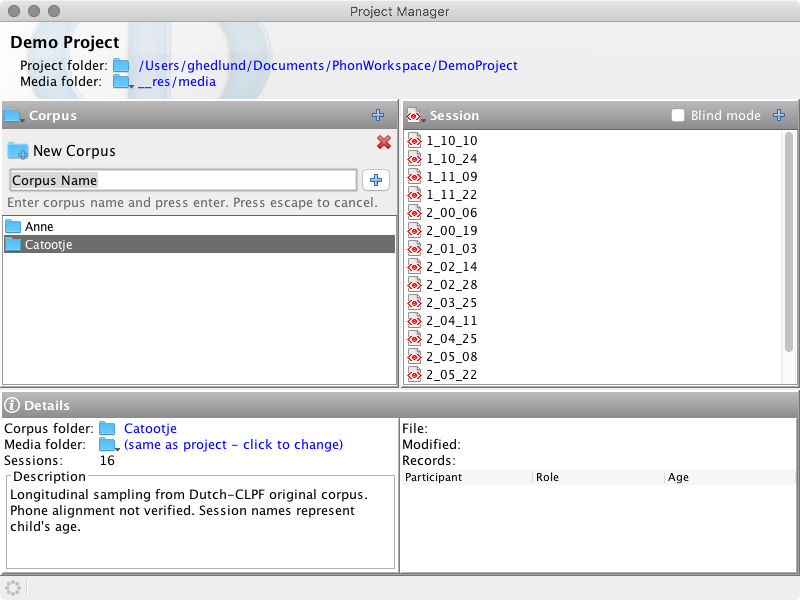
Corpora group related sessions inside a project. In the classic Project Manager, select a corpus on the left to list its sessions and show its folder, media folder, session count, and description. The Project Tree presents the same corpora as folders.
Create a corpus
Use the plus button in the classic Corpus header for quick name-only creation. Press Enter or the add button to create it; press Escape or the close button to cancel.
The New corpus... menu command opens a dialog for both a name and description. A corpus name must be non-empty, unique, and valid as a folder name; periods are not accepted.
Manage corpora
The Corpus title menu, context menu, and Project > Corpus menu provide Duplicate, Rename, Delete, and Edit corpus template actions. Commands that support multiple selections change their label to Corpora.
Deleting requires confirmation and cannot be undone. Duplicating creates a uniquely named copy. Renaming updates the corpus folder through Phon.
Edit the session template
Select Edit corpus template... to open a Session Editor for the selected corpus's template. Configure its participants, session header, tiers, and media defaults as needed, then save it. New sessions created in that corpus copy the template; existing sessions are not changed.