
Search View
The dockable Search view searches the current session and keeps a table of results available for navigation. Select Search in the right view strip or press the platform menu shortcut plus 8.
For a compact search-and-replace panel inside the Transcript, see Find and Replace in the Transcript.
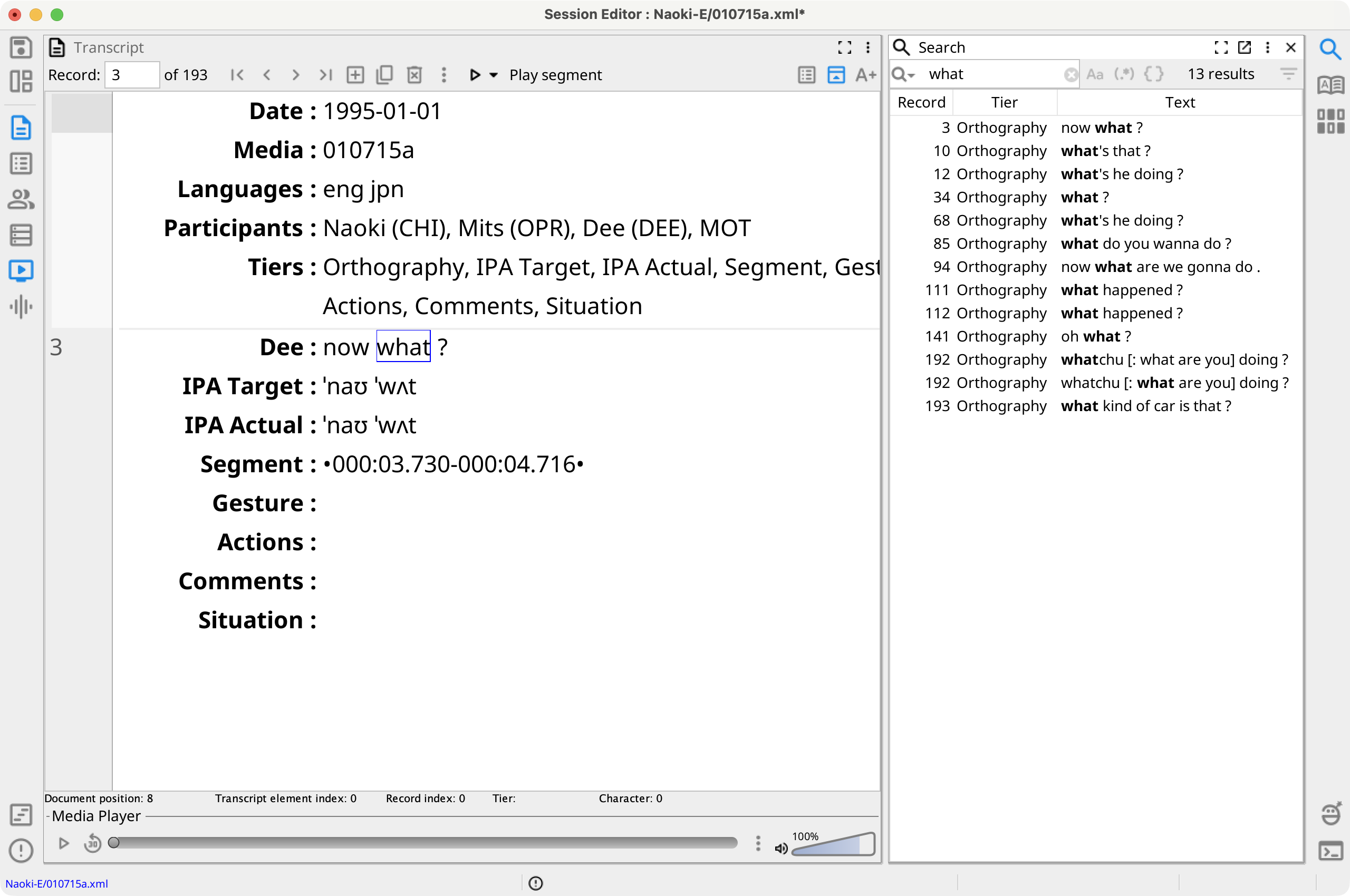
Search a Session
- Enter a query in Search tiers... and press Enter.
- Review the Record, Tier, and Text columns. Matching text is bold in the Text column, and all results are highlighted in an open Transcript.
- Select a result to navigate to and select its text in the Transcript. In single-record mode, Phon first switches to the matching record.
The search runs in the background. While results remain open, Phon updates them when records, tier values, comments, or gems change. Closing the Search view clears its Transcript highlights.
Search Modes, Filters, and History
Plain text is the default. Toggle Match case, Regular expression search, or Phonex search. Regular expression and Phonex modes are mutually exclusive.
Search includes visible tiers for every speaker, plus comments and gems. The Filter menu can restrict the search to selected visible tiers or speakers and can exclude comments or gems. Select Reset filters to restore the defaults.
Select the search icon at the start of the field to reopen a recent query. The history restores its plain-text, regular-expression, or Phonex mode and its case-sensitivity setting.