
IPA Dictionary
The IPA Dictionary view manages the transcription sources used when generating automatic IPA transcriptions. Sources are listed in priority order — sources higher in the list are consulted first.
Select IPA Dictionary in the right view strip, or press the platform menu shortcut plus 9.
Use Auto-transcribe IPA tiers… (at the top right of the view) to run auto-transcription on the current session using the configured dictionary sources. The complete ordered list, including User-entered transcriptions, supplies inline suggestions while editing IPA tiers in the Transcript.
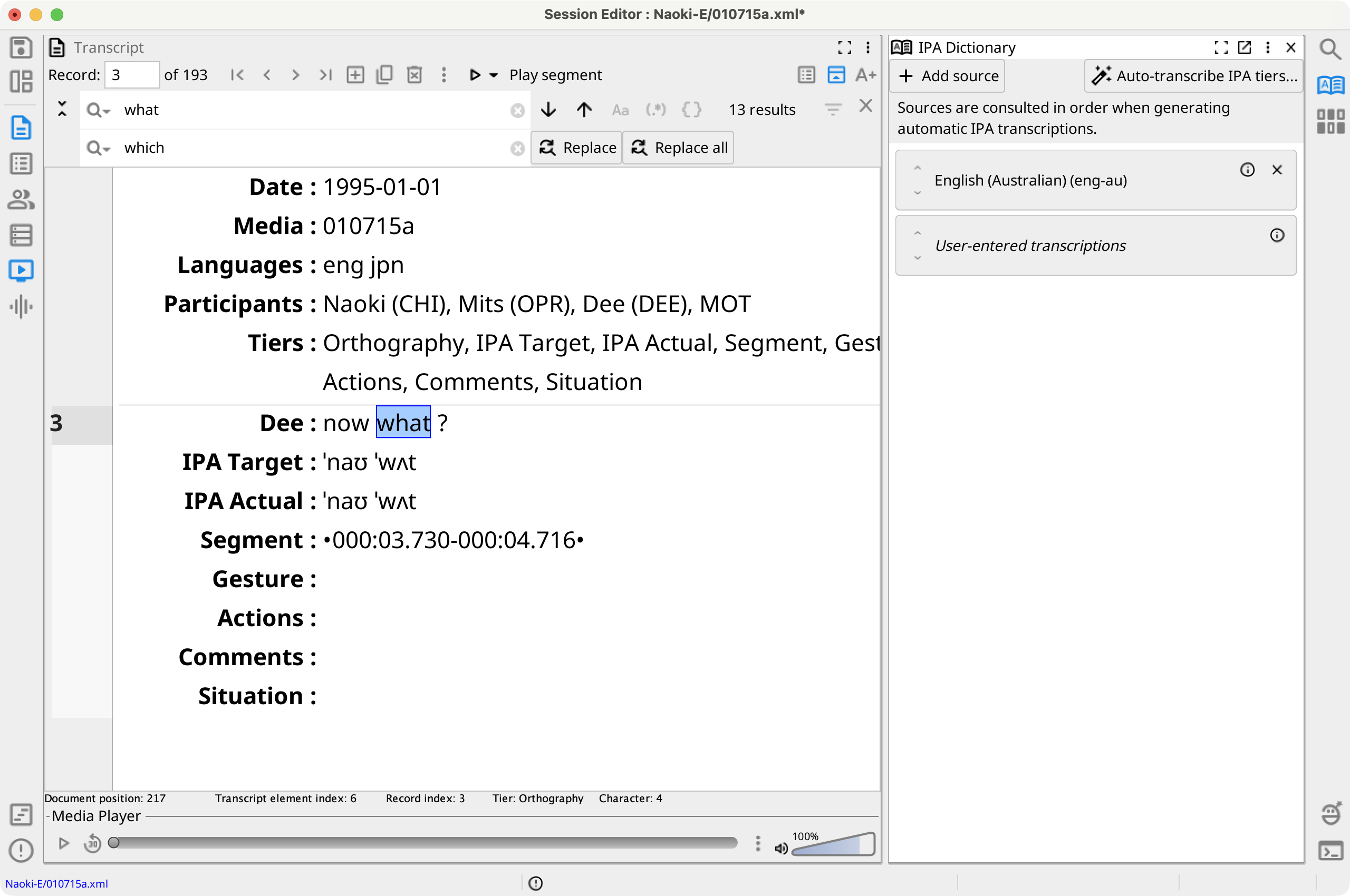
Source List
Each source appears as a card in the list. Three types of sources are available:
- Language dictionaries — built-in IPA dictionaries for a specific language (e.g., English (eng)).
- User-entered transcriptions — words already transcribed in the current session.
- Custom sources — user-supplied CSV-backed dictionaries. See #ipa_lookup_view__custom_sources below.
Source cards provide the following controls:
- Up/down arrow buttons — move the source one position higher or lower in the priority order.
- ℹ (info) — display details about the source.
- Pencil (edit) button — reopen the source configuration dialog. Shown only on custom-source cards.
- × (remove) — remove a dictionary source from this session's list. This does not delete any files; the source can be re-added and remains available to other sessions and projects. The User-entered transcriptions source has no remove or edit button.
You can also reorder sources by dragging a card to a new position in the list.
Click Add source (top left) to open the Select sources to add picker. The picker shows every available source not already in the list. Use the filter field to narrow the list, select one or more entries, then click OK. Each entry in the picker shows an info button. Custom-source entries also show a delete button that permanently removes that source's files from disk (with confirmation) and also removes it from the current session list if present.
Custom CSV Sources
A custom source maps orthographic words to IPA transcriptions using a CSV file you supply. Custom sources are available alongside built-in language dictionaries in the source picker and in other sessions and projects, depending on their scope.
Creating a custom source
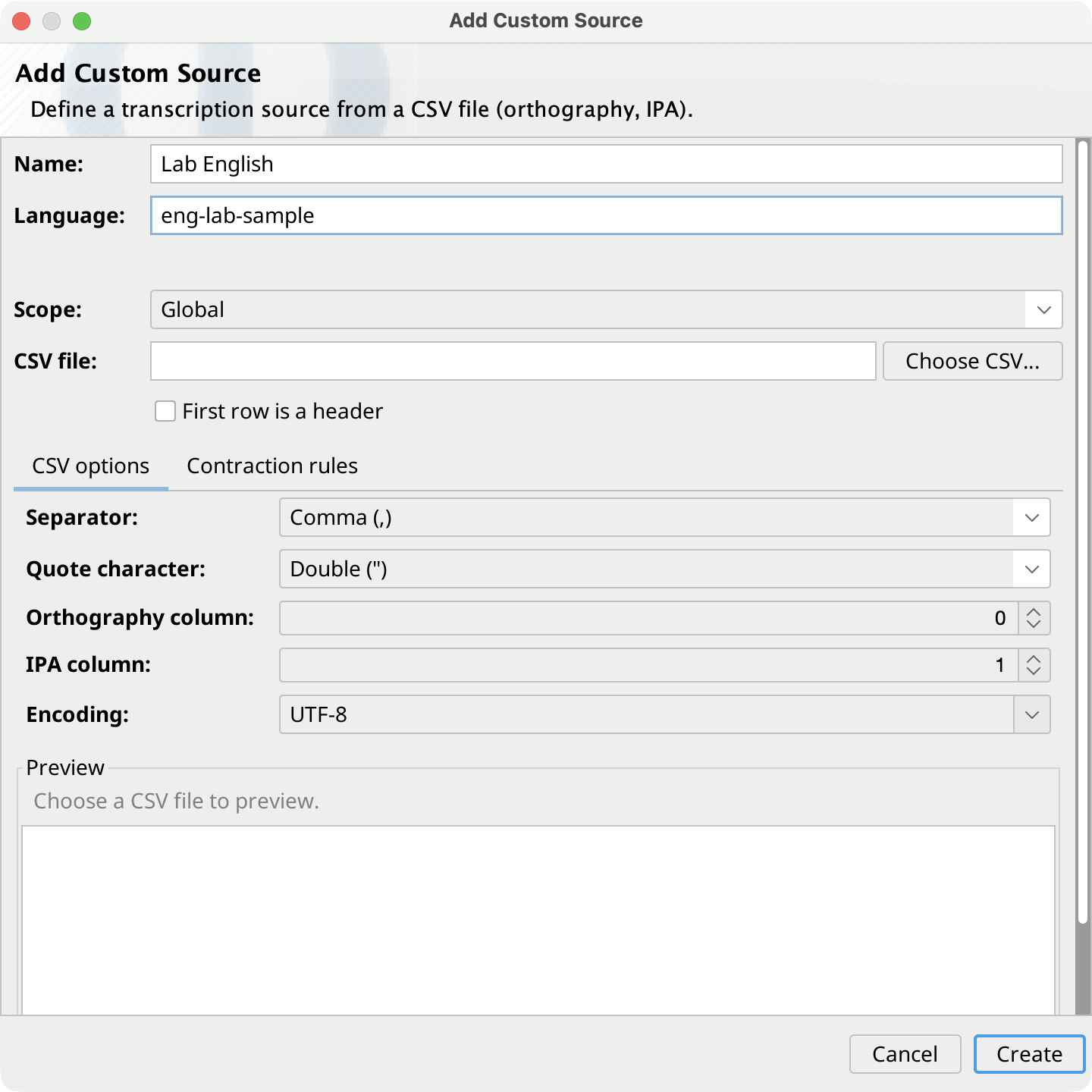
In the Select sources to add picker, click Add custom source (CSV)… to open the Add Custom Source dialog. Fill in the following fields:
- Name — a required, human-readable label for the source.
- Language — required. The primary subtag (the portion
before the first
-) must be a valid ISO 639-3 code (e.g.,eng). You may append optional user-defined subtags to make the code unique (e.g.,eng-uk-customoreng-lab). The code must not duplicate an existing dictionary's language code. The language code is immutable after creation — it serves as the source's identity. - Scope — Global makes the source available in all projects; Project stores it with the current project and limits availability to that project. Project scope is available only when a project is open.
- CSV file — click Choose CSV…
to select a file. A live preview of the first rows appears below the CSV
options controls. Configure:
- Orthography column — zero-based index of the column containing the written word.
- IPA column — zero-based index of the column containing the IPA transcription.
- First row is a header — check if the first row contains column names rather than data.
- Separator, Quote character, and Encoding — set to match your file's format. The separator is auto-detected on file selection.
- Contraction rules tab — optional. Define rules for expanding contracted forms before lookup. You can copy rules from an existing dictionary using the Copy rules from selector.
Click Create to save the source. It is added to the current session's source list immediately and the picker dialog closes.
Editing a custom source
Click the pencil button on a custom-source card in the session list to reopen the Edit Custom Source dialog. The Language field is disabled in edit mode because the language code is the source's identity and cannot be changed. The Scope is also fixed and cannot be changed after creation. All other fields and CSV options are editable. Click Save to apply changes.
Storage locations
Custom source files are stored in a dict/custom subfolder within
the applicable scope location:
- Global — the application support folder
(
dict/custom). - Project — the project's
__res/dict/customfolder.